- macOS · universal
- Windows · x64
- Linux · deb · rpm · pacman · tar.gz
- MIT
- Codex · Gemini · Grok · Kimi · Qwen
Run coding agents by the dozen.
An open-source desktop for running coding agents on machines you own. Start threads across every repo you have, each in its own git worktree so they never collide, on Codex, Gemini CLI, Grok Build, Kimi Code, or Qwen Code — whichever CLI you already pay for. Let one agent hand work off to a thread on another. Watch the diffs, track the PRs, and steer any of it from Telegram, Discord, Slack, Mattermost, Feishu / Lark, or LINE when you're nowhere near the keyboard.
brew install --cask pwrdrvr/tap/pwragent
Universal build (Apple silicon + Intel) · macOS 12 Monterey or later · signed and notarized, one Gatekeeper prompt on first launch
Other platforms
- macOS
- Universal .dmg · Apple silicon .dmg (smaller) ·
brew install --cask pwrdrvr/tap/pwragent - Windows
- x64 installer .exe
- Linux x64
- Linux x64 .deb · Linux x64 .rpm · Linux x64 .pacman · Linux x64 .tar.gz
- Linux arm64
- Linux arm64 .deb · Linux arm64 .rpm · Linux arm64 .pacman · Linux arm64 .tar.gz
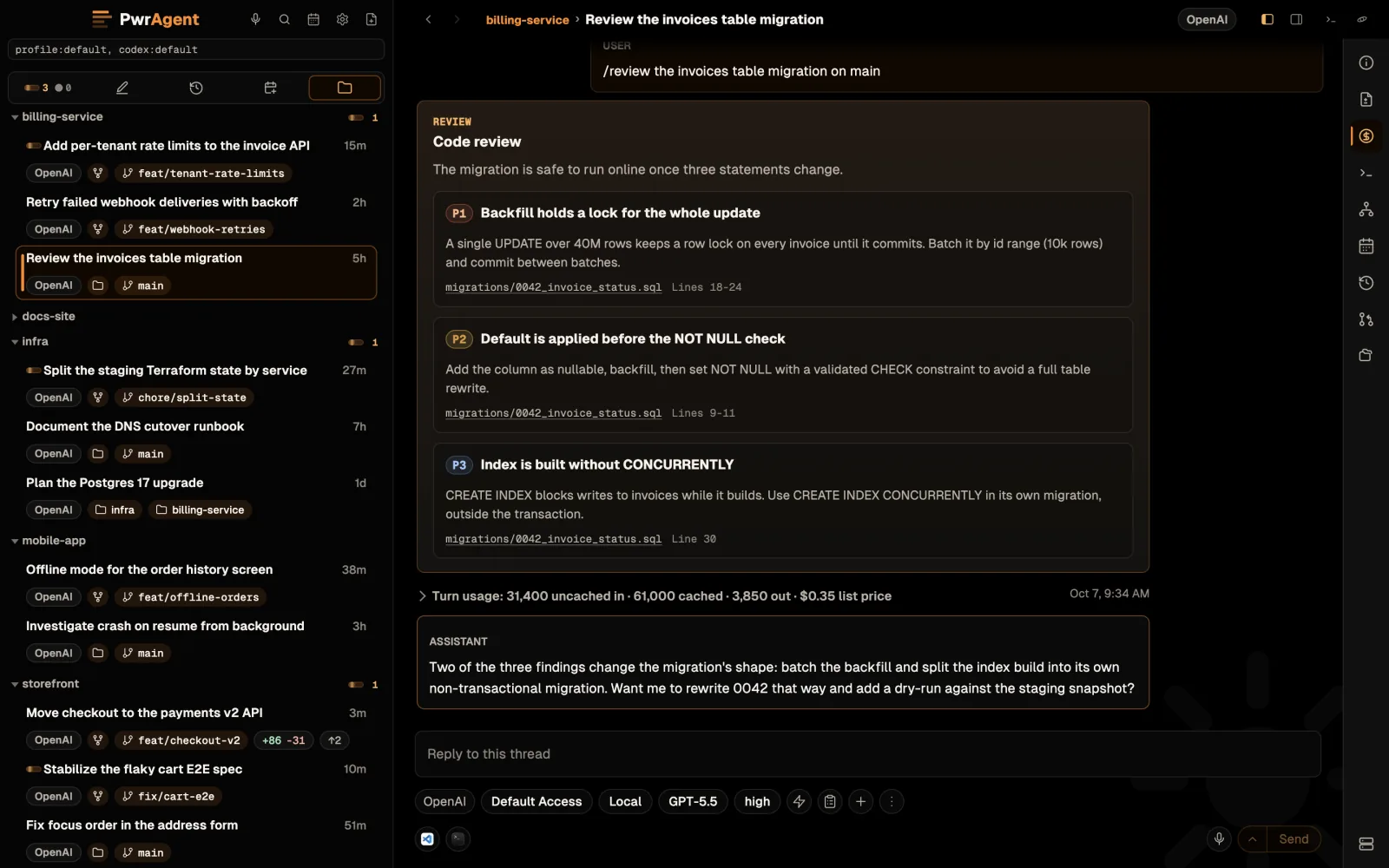
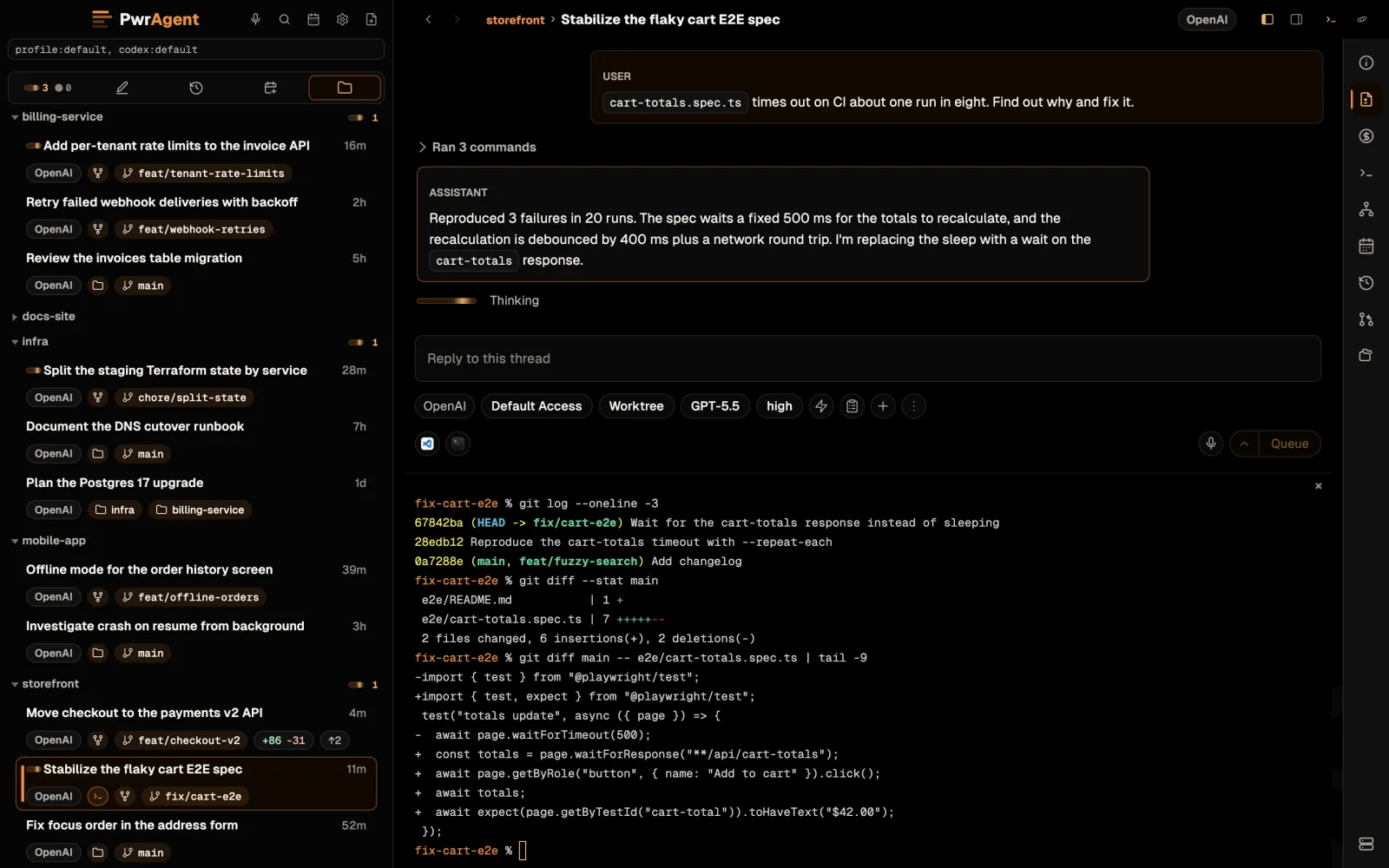
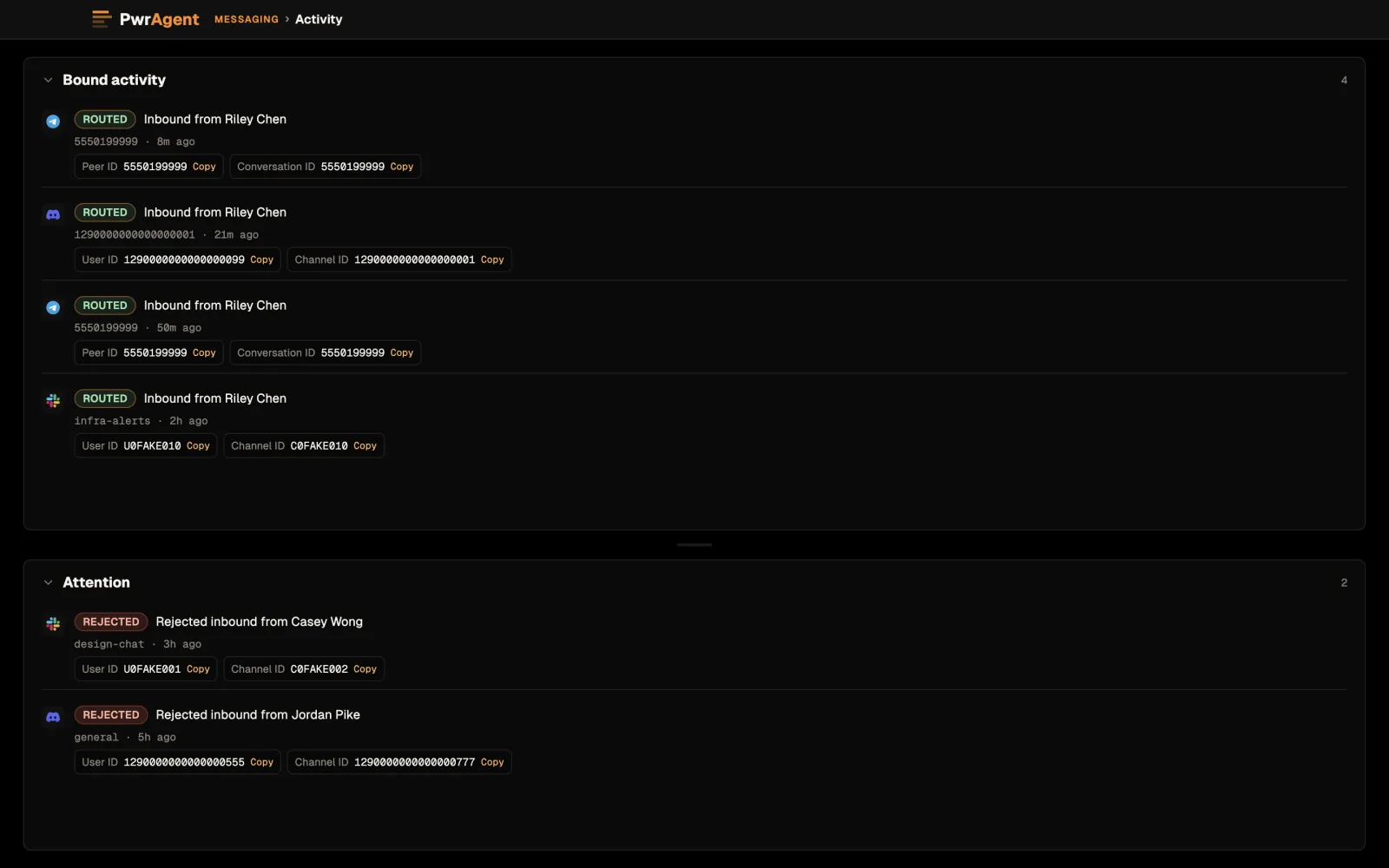
Features
One agent is easy. Twelve is the problem.
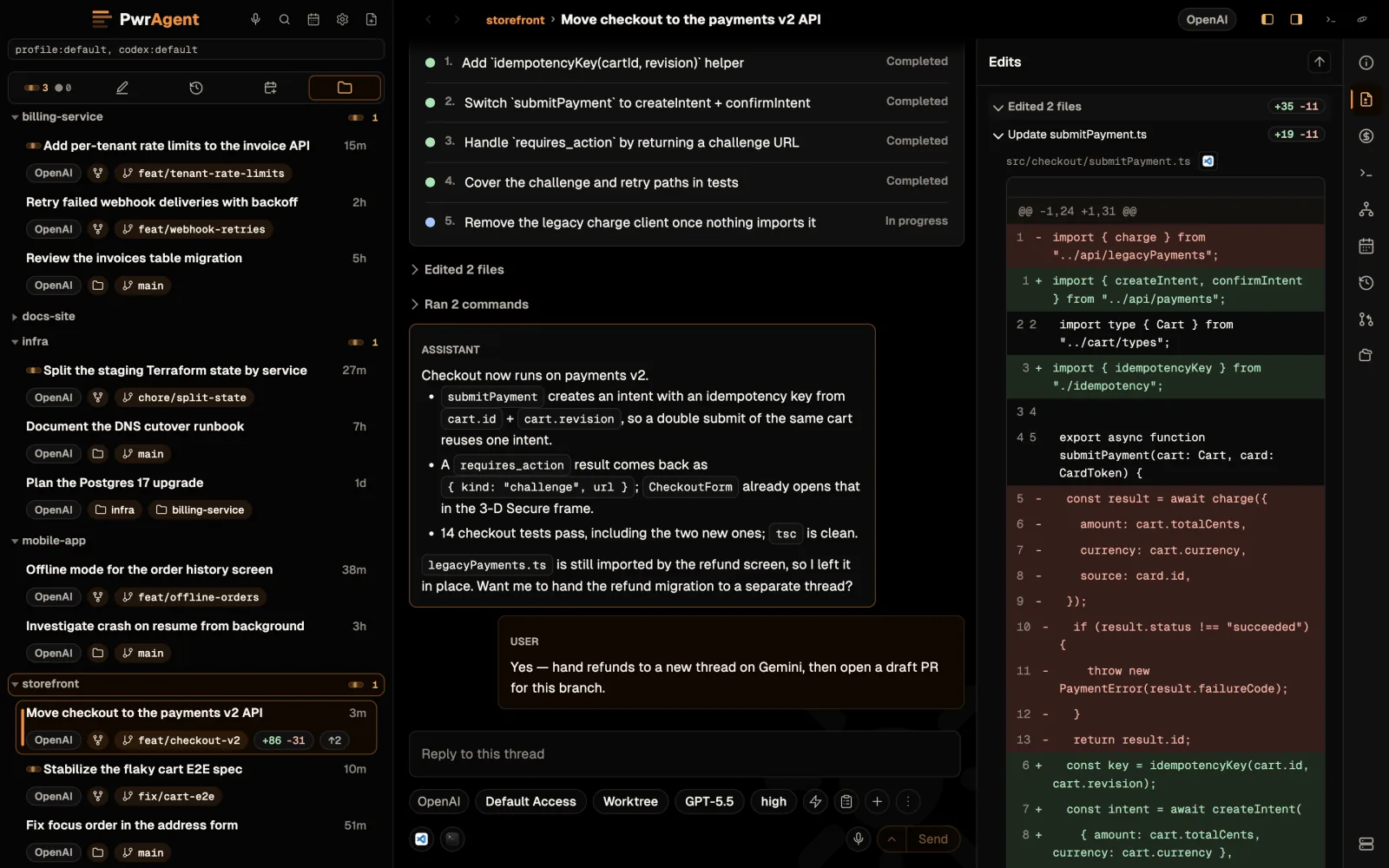
The hard part was never getting an agent to write code — it's keeping hold of six of them at once, across four repos, without stepping on each other's branches or losing track of which ones are finished. That's the app.
-
Runs whichever coding agent you already have
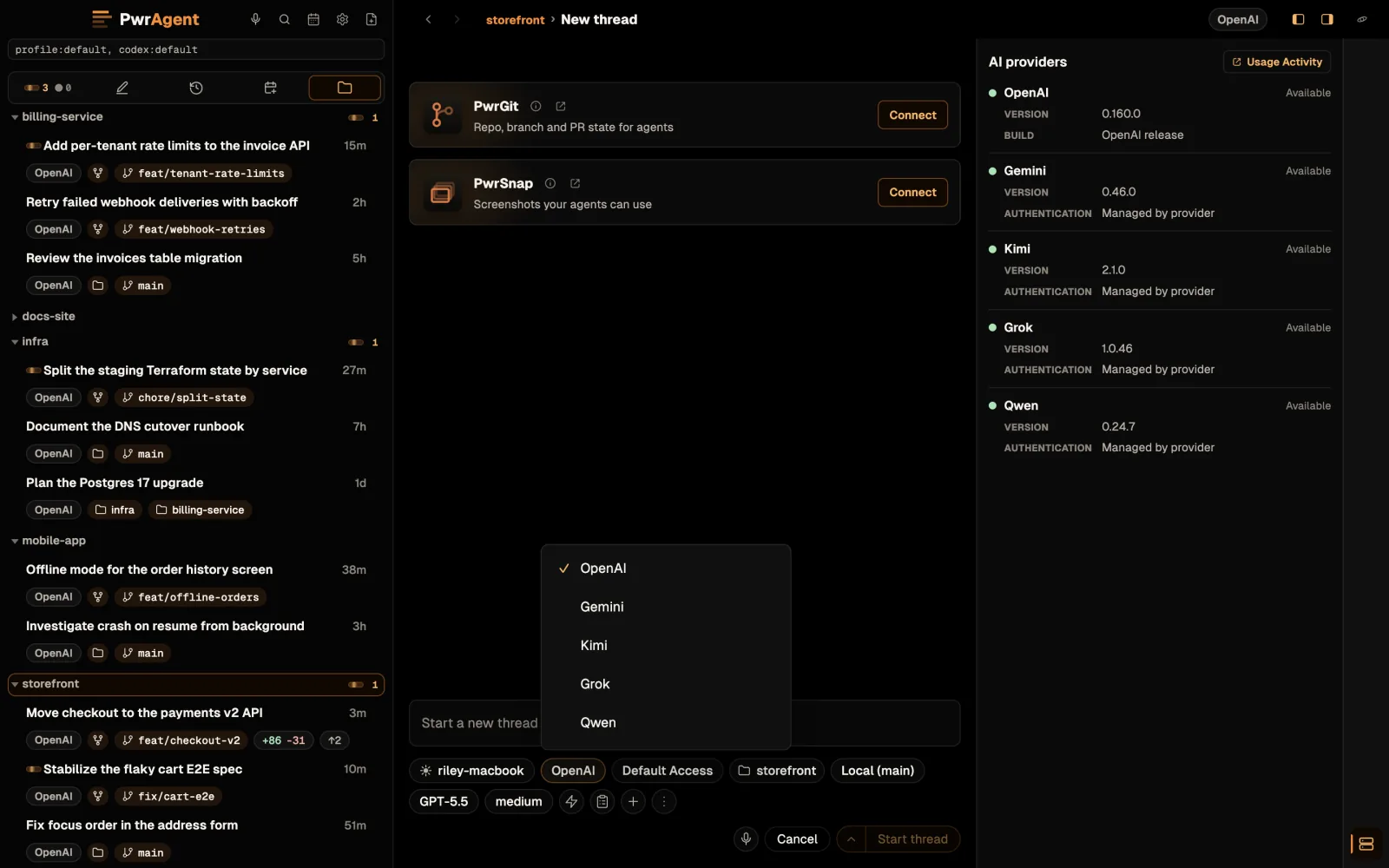
Codex is the default. Point a thread at Gemini CLI, Grok Build, Kimi Code, or Qwen Code instead and PwrAgent drives that CLI over the Agent Client Protocol — the copy already installed on your machine, signed in to the account and plan you already pay for. Grok Build doesn't even need installing: PwrAgent ships a build of it, and you sign in with your own xAI account the first time you use it. The provider is a dropdown in the composer when you start a thread, sitting next to the model, access-mode, and fast-mode controls. PwrAgent opens no account, holds no model key, and adds nothing to your bill. It doesn't sandbox those CLIs either: an installed agent is a third-party local executable with its own credentials and its own reach, and PwrAgent says so rather than pretending otherwise.
- Codex · Gemini · Grok · Kimi · Qwen
- provider picked per thread
- your CLI · your sign-in · your plan
- no PwrAgent key
-
One agent can put the others to work
A thread doesn't have to do everything itself. PwrAgent exposes its own tools to the agent running in it, so a thread can hand a task off to a different thread — and name the backend when it does. Put a strong reasoning model in charge of the plan and let it farm the mechanical passes out to cheaper threads on another agent entirely. It can also attach a directory, move a thread's workspace, kick off a review, or message another thread mid-run.
handoff_task· cross-backendstart_reviewsend_message_to_thread- sub-agents visible in the transcript
-
Stack three asks and walk away
Send
make a branch and PR for the OAuth refactor, then queue/review main, then queuesquash and force-push. The composer dispatches them FIFO, one turn at a time. You walk away. By the time you come back, three things are done.- FIFO queue
- one turn at a time
- steer mid-turn
-
Swarms that span every machine you own
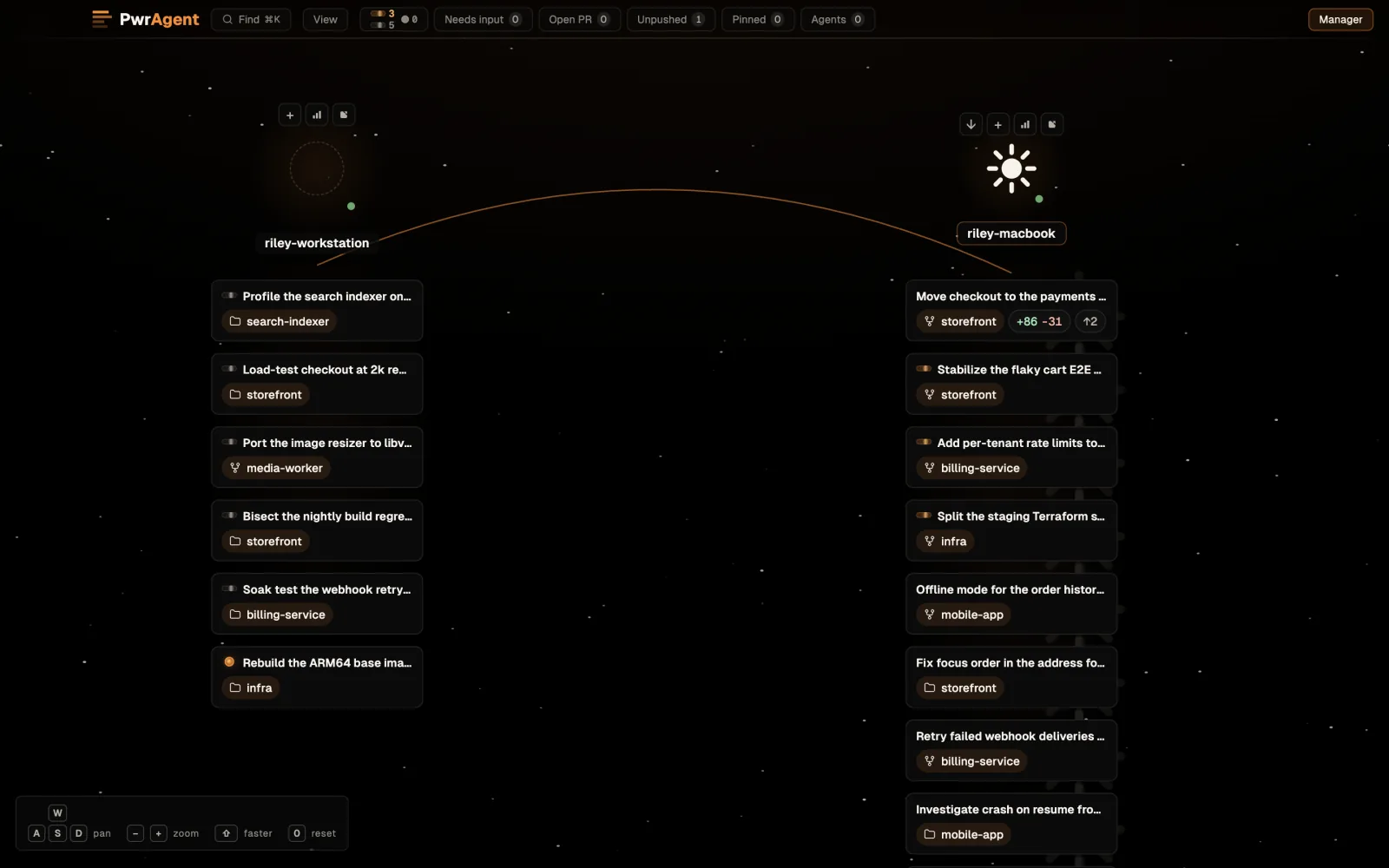
One laptop is a small fleet. Federation pairs separate PwrAgent instances — the desktop at home, the workstation at the office, a box in a closet — over an encrypted control channel, and from then on each can see and drive the other's work. Mount a remote thread in a viewer window with its transcript live, open an integrated terminal on the far machine, and search every connected instance at once with Command+K (Control+K on Windows and Linux). The Star Map puts the whole fleet on one screen — threads in orbit around the projects they belong to, per-machine load, filter chips, and fly-to-thread when you spot the one you want.
- encrypted instance-to-instance
- Tailscale · Cloudflare Tunnel · SSH · local
- remote threads + remote terminals
- Star Map
-
Steer it from wherever you happen to be
Pair a bot once and the whole thing follows you out of the house. Approvals, follow-up prompts, "what did you ship while I was at lunch" check-ins — from Telegram, Discord, Slack, Mattermost, Feishu / Lark, or LINE. The agents keep running on your machine; the messenger is only the steering wheel. Fine on cellular and on hotel WiFi that drops every two minutes.
- six platforms
- start · resume · steer · approve
- closed by default
-
Isolated profiles for work, personal, side projects
Open as many PwrAgent windows as you want, each on its own profile, each with its own Codex sign-in. Work threads in one window, personal in another, the side project in a third. Thread state, settings, and messaging credentials never cross.
- one window per profile
- separate Codex sign-in
--profile <name>
-
Your code and your credentials stay where they are
The agents work in the checkout they were pointed at, on the machine that already has your toolchain and your keys. PwrAgent's own state sits under
~/.pwragent/, one directory per profile, and bot tokens are encrypted at rest by your operating system's credential store. Messaging is closed by default: only user IDs you allowlist can reach the bot, and shared spaces need the space and the user. Details in Privacy.~/.pwragent/- OS-encrypted tokens
- closed by default
- two-keyed allowlists
-
Free, MIT-licensed, dogfooded
The author uses it as their primary coding environment. Hundreds of PRs in this repository and others were created or reviewed through PwrAgent. It's signed on every platform, and free. The full source — Electron app, messaging adapters, replay test harness — is on GitHub. Same philosophy as its sibling, PwrSnap.
- MIT
- signed on all three platforms
- single contributor
- hundreds of PRs shipped
Privacy
Nothing leaves your machine unless you say so.
There is no PwrAgent cloud. The agents run on your own machines, next to your checkouts. Settings and credentials live under ~/.pwragent/. There is no PwrAgent-owned server in the loop: your messenger talks to your machine, and your machine talks to the agent CLI you picked for that thread — on the sign-in and the plan you already pay for, whether that's Codex, Gemini CLI, Grok Build, Kimi Code, or Qwen Code.
Federation is between machines you enroll, and nobody else. When you pair two PwrAgent instances, they talk to each other directly over an encrypted channel on a transport you choose — your LAN, Tailscale, a Cloudflare Tunnel, or SSH. There is still no PwrAgent-operated relay in the middle, and an instance you haven't enrolled cannot see anything. It's off until you set it up.
Messaging is closed by default — and stays that way. Only platform user IDs you have explicitly allowlisted can reach the bot. Inside shared spaces (Slack workspaces, Discord servers, Telegram supergroups) authorization is two-keyed: the space has to be on the allowlist and so does the user. Inviting the bot into a workspace doesn't authorize anyone in it. Unauthorized attempts are denied and surfaced in the messaging activity log, so you can see who tried and from where.
| Data | Where it goes | Default |
|---|---|---|
| Threads, prompts, your code | Nowhere. PwrAgent's own state — thread metadata, settings, messaging bindings — lives under ~/.pwragent/profiles/<name>/. Transcripts stay in the agent CLI's own store, on the same machine. Your code stays in the checkout it was always in. |
Never leaves |
| Agent requests | Through the agent CLI you picked — Codex, Gemini CLI, Grok Build, Kimi Code, or Qwen Code — to the provider that CLI is signed in to, billed to the plan you already have. PwrAgent holds no model key and runs no server of its own. | Your agent's plan |
| What a turn costs | Shown to you, not reported anywhere. PwrAgent estimates each turn and thread from the providers' published rates and displays it next to the transcript; you can set a spend alert on a turn or a thread. The estimate is computed locally and never sent. | Local estimate |
| Messenger traffic | Between your laptop and the platform you paired — Telegram, Discord, Slack, Mattermost, Feishu / Lark, or LINE — exactly like any other message you send there. No PwrAgent relay sits in the middle. | Only what you send |
| Bot tokens | Nowhere. Encrypted at rest through Electron safeStorage, which hands off to your OS credential store — Keychain on macOS, DPAPI on Windows, libsecret / kwallet on Linux. |
Never leaves |
| Update check | A plain HTTPS request to GitHub's release feed — PwrAgent's own, plus pwrdrvr/grok-build's while managed Grok builds are on. No account, no device ID. |
GitHub only |
| Telemetry, analytics, crash reports | None. There is no PwrAgent server to send them to. | Never |
Install
Up and running in five minutes.
Signed builds for macOS, Windows, and Linux, straight from GitHub Releases. Install it, point it at a repo, and start a thread on whichever agent CLI you already have — the first-run wizard walks through providers, profiles, and (if you want it) pairing a messenger with a one-time code. Per-platform walkthroughs live in the docs.
-
macOS
Most tested Detected- Two builds: universal, native on Intel and Apple silicon alike, and a smaller Apple silicon one for M-series Macs. Unsure? Take universal.
- Homebrew picks the build for your Mac — Apple silicon or universal — and from then on PwrAgent updates itself in-app.
- macOS 12 Monterey or later.
- Developer ID-signed and notarized by Apple: first launch is one Gatekeeper prompt, no right-click-open dance.
- Open the DMG, drag PwrAgent to Applications, launch it.
- The largest desktop end-to-end test matrix of the three, and the author's daily driver.
-
Windows
Detected- x64 installer for Windows 10 and 11.
- Authenticode-signed by PwrDrvr LLC through Azure Artifact Signing — SmartScreen sees a known publisher.
- Per-user install under your profile; no admin prompt, and you can pick the install directory.
- Native window chrome, process-tree cleanup, and native PowerShell environment setup. Git and Git LFS ship inside the app, so PwrAgent doesn't need a system Git.
- Verify before you run it: right-click the installer → Properties → Digital Signatures should name PwrDrvr LLC. Checksums are in
PwrAgent-windows-SHA256SUMSon every release.
-
Linux
DetectedEvery format comes for x64 and arm64. Not sure which CPU you have?
uname -mprintsx86_64for x64 oraarch64for arm64. The commands fetch the latest release by its stable link, so there is no version number to edit.Debian, Ubuntu .deb
x64curl -fLO https://github.com/pwrdrvr/PwrAgent/releases/latest/download/PwrAgent-linux-x64.deb && sudo apt install ./PwrAgent-linux-x64.debarm64curl -fLO https://github.com/pwrdrvr/PwrAgent/releases/latest/download/PwrAgent-linux-arm64.deb && sudo apt install ./PwrAgent-linux-arm64.debFedora, RHEL, openSUSE .rpm
x64sudo dnf install https://github.com/pwrdrvr/PwrAgent/releases/latest/download/PwrAgent-linux-x64.rpmarm64sudo dnf install https://github.com/pwrdrvr/PwrAgent/releases/latest/download/PwrAgent-linux-arm64.rpmzypper installtakes the same URL. Or download the package: x64 .rpm · arm64 .rpmArch .pacman
x64sudo pacman -U https://github.com/pwrdrvr/PwrAgent/releases/latest/download/PwrAgent-linux-x64.pacmanarm64sudo pacman -U https://github.com/pwrdrvr/PwrAgent/releases/latest/download/PwrAgent-linux-arm64.pacmanOr download the package: x64 .pacman · arm64 .pacman
Any distribution, portable .tar.gz
Download x64 .tar.gz or arm64 .tar.gz , extract it anywhere, and run
pwragentfrom the extracted directory. No package manager involved: to upgrade, replace the directory.- The
.deb,.rpm, and.pacmanpackages add PwrAgent to your application menu. - Stable download links, so every command and button above always fetches the latest release.
- Updates on Linux are manual: run the same command again, or install the newer package from the same link.
SHA256SUMSon every release covers every Linux file — all four formats, both CPUs.
- The
Downloads track the Stable channel, and the messaging surface carries daily use — the author's own work depends on it. The honest roadmap lists what's still missing. Want what's next before it's stable? Settings → Updates lays the release channel out as a grid: a train (Stable or Beta) crossed with a track (Latest or Prerelease). Every release carries the universal and Apple silicon DMGs, the Windows x64 installer, and Linux .deb, .rpm, .pacman, and .tar.gz for x64 and arm64, with one checksum file per OS. Older versions, release notes, and checksums live on GitHub Releases.
FAQ
Things you might ask.
-
Do I need an account?
Not a PwrAgent one. Download, install, pair: there is no sign-up, no license key, and no PwrAgent server to sign in to. What you do need is an agent CLI on your machine that you're already signed in to — Codex, Gemini CLI, Grok Build, Kimi Code, or Qwen Code — and the work is billed to that plan, exactly as it would be if you ran the CLI in a terminal yourself.
-
Which platforms does it run on?
macOS, Windows, and Linux — all three are supported, all three ship signed builds with every release. macOS is the most tested: it carries the largest desktop end-to-end test matrix in CI and is the author's daily driver. Windows and Linux are real targets rather than build-only artifacts — both have had substantial work and a long tail of fixes, and both are exercised on every change.
macOS needs 12 Monterey or later, with a universal build and a smaller Apple silicon one; Windows is x64 on 10 and 11; Linux ships
.deb,.rpm, and.pacmanpackages plus a portable.tar.gz, each for x64 and arm64. On a Mac,brew install --cask pwrdrvr/tap/pwragentworks too. -
Which coding agent does it run?
Whichever of these you already have installed: Codex, Gemini CLI, Grok Build, Kimi Code, or Qwen Code. Codex is the default — a new thread lands there when it's available — and the others are driven over the Agent Client Protocol. Each one appears in Settings → AI Providers whether or not it's installed, so you can see at a glance what PwrAgent found and where; when you start a thread, the provider is a dropdown in the composer next to the model, access-mode, and fast-mode controls. PwrAgent looks for each CLI on your
PATHand in the vendor's usual install directory, and you can point it at an exact binary instead. The one it supplies itself is Grok Build: the installer carries a pinned build, and Settings → AI Providers → Grok can keep it updated with signature-checked releases. You still sign in to Grok with your own xAI account; PwrAgent never does that part for you.PwrAgent adds no key and no account of its own — the request rides the CLI's own sign-in and bills to your plan. Worth knowing what that means for trust: an installed agent CLI is a third-party program running as you, with its own credentials and its own filesystem and network access. PwrAgent mediates the permission prompts it's asked to mediate; it is not a sandbox around someone else's binary.
-
What does it cost to run?
PwrAgent itself is free, and it adds nothing to your bill: no PwrAgent API key, no markup, no metering. The model usage is whatever your agent CLI would have cost anyway on the plan it's signed in to — a personal subscription, a pay-as-you-go key, or a company plan.
Because that's the part with a number attached, PwrAgent shows it. Each turn and each thread carries a running estimate computed from the providers' published rates, optionally alongside a Codex Credits estimate, and you can set a spend alert that fires when a single turn or a whole thread crosses a threshold you pick. It's an estimate at list prices, computed on your machine — the app says as much where it shows it, and real billed usage can differ.
-
Which messengers can I use?
Six: Telegram, Discord, Slack, Mattermost, Feishu / Lark, and LINE. You pair a bot from Settings → Messaging → <your platform> with a one-time code — no IDs to look up, no JSON to paste. One workflow layer drives all six from the same code path, so a thread behaves the same wherever you're reading it. End-to-end setup for each platform is in the docs.
-
Is this safe to use for work?
The controls are built for it: messaging is closed by default, only allowlisted user IDs can reach the bot, and shared spaces are two-keyed — the space and the user both have to be allowlisted. Inviting the bot into a workspace authorizes nobody. Every denied attempt shows up in the messaging activity log. Secrets are encrypted at rest by your OS credential store, and the agent's permission mode is set per thread.
What the project can't tell you is whether your employer's policies permit any of this. Research and comply with your company's policies before installing PwrAgent on a work machine or connecting it to a work messaging platform — use your employer's approved platform, and walk the integration through your security team first. That call is yours, not the project's.
-
Does this replace Codex Desktop?
No — it sits alongside it. On Codex threads PwrAgent uses Codex's thread store, its authentication, and its agent, so a thread started in either app shows up in the other. What PwrAgent adds on top is the desktop UI, the messaging surface, profile isolation, per-thread provider / model / access / fast-mode controls, worktree isolation with handoff, and a Markdown composer. When you want the two kept apart instead, profiles handle it. Threads you point at another agent are that agent's, and Codex Desktop never sees them.
-
Where does my data live?
On your machine, in two places, both local. PwrAgent's own state — thread metadata, settings, messaging bindings — is under
~/.pwragent/profiles/<name>/, one directory per profile, on every platform. The transcripts themselves belong to the agent CLI and stay in its store, which is why a Codex thread opens the same in Codex Desktop. Bot tokens are encrypted at rest through ElectronsafeStorage, which hands off to your OS credential store (Keychain, DPAPI, or libsecret / kwallet) rather than leaving them in a config file. Your code never moves: the agent works in the checkout it was pointed at. Launch a second profile with--profile <name>and nothing crosses between them. -
How do updates work?
PwrAgent checks GitHub's release feed and offers the update in-app. Settings → Updates shows the release channel as a two-by-two grid: a train — Stable, or Beta, which builds off main — crossed with a track — Latest, or Prerelease, which is newer and may not install. Each slot names the build it would give you and links its release notes. New installs sit on Stable + Latest, the smoke-checked default, so an alpha build can't land on you by accident. If a switch would move you backwards, the app offers that explicitly rather than telling you you're up to date with no way back. Linux is the exception: it updates by hand. Reinstall the
.deb,.rpm, or.pacmanfrom the same stable link — the install commands above always fetch the latest release — or replace the.tar.gzdirectory. -
Is it really free? Who's behind it?
Free and MIT-licensed, with the full source — Electron app, messaging adapters, replay test harness — on GitHub. PwrAgent is built by PwrDrvr LLC: one author, who uses it as their primary coding environment, alongside its sibling, PwrSnap. No investors, no upgrade tier, no plan to add one.
Something else? Open a GitHub issue or ask @PwrAgentAI.